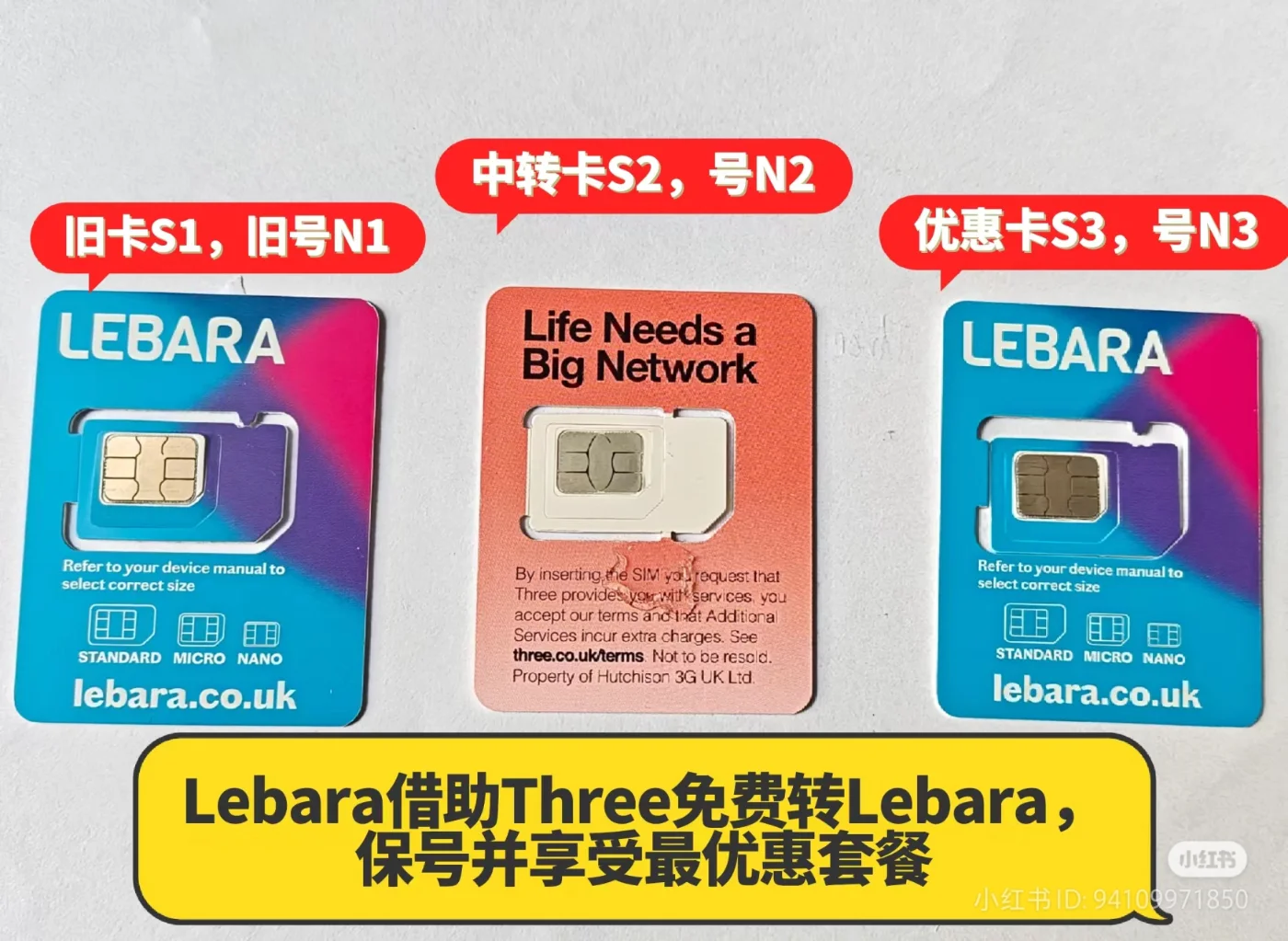
Already using Lebara and spotted a new SIM deal, but don’t want to lose the number linked to your bank, university and other accounts?
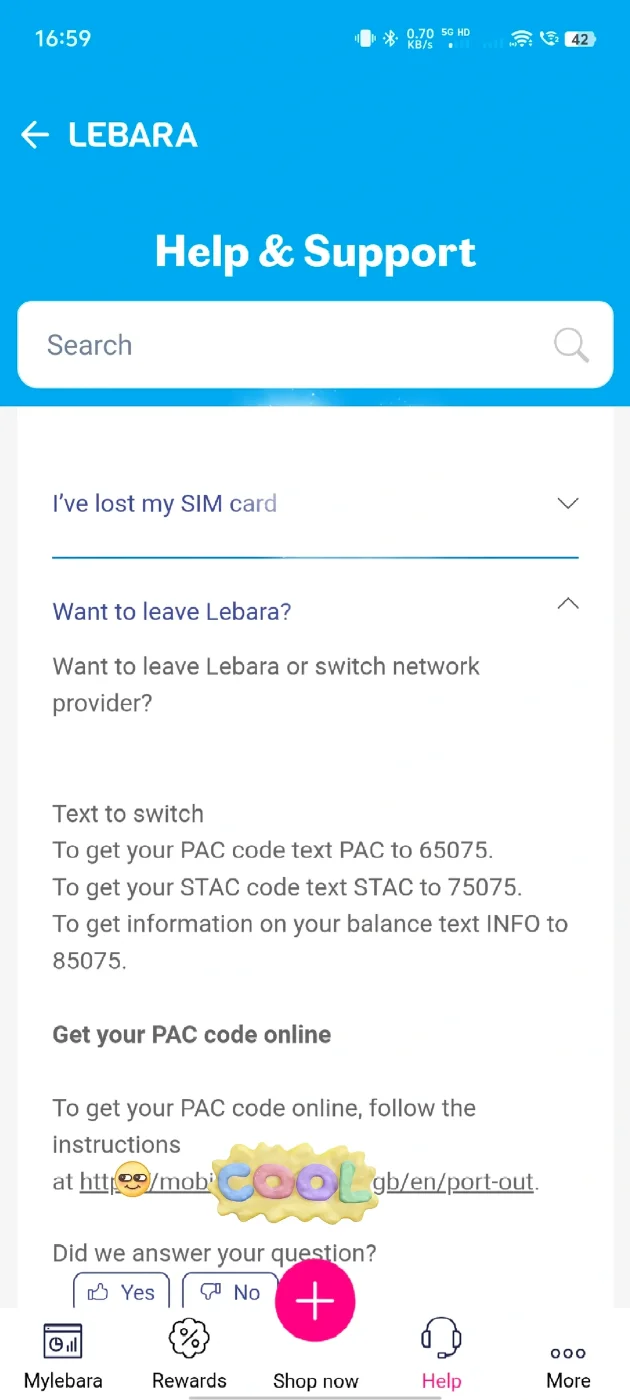
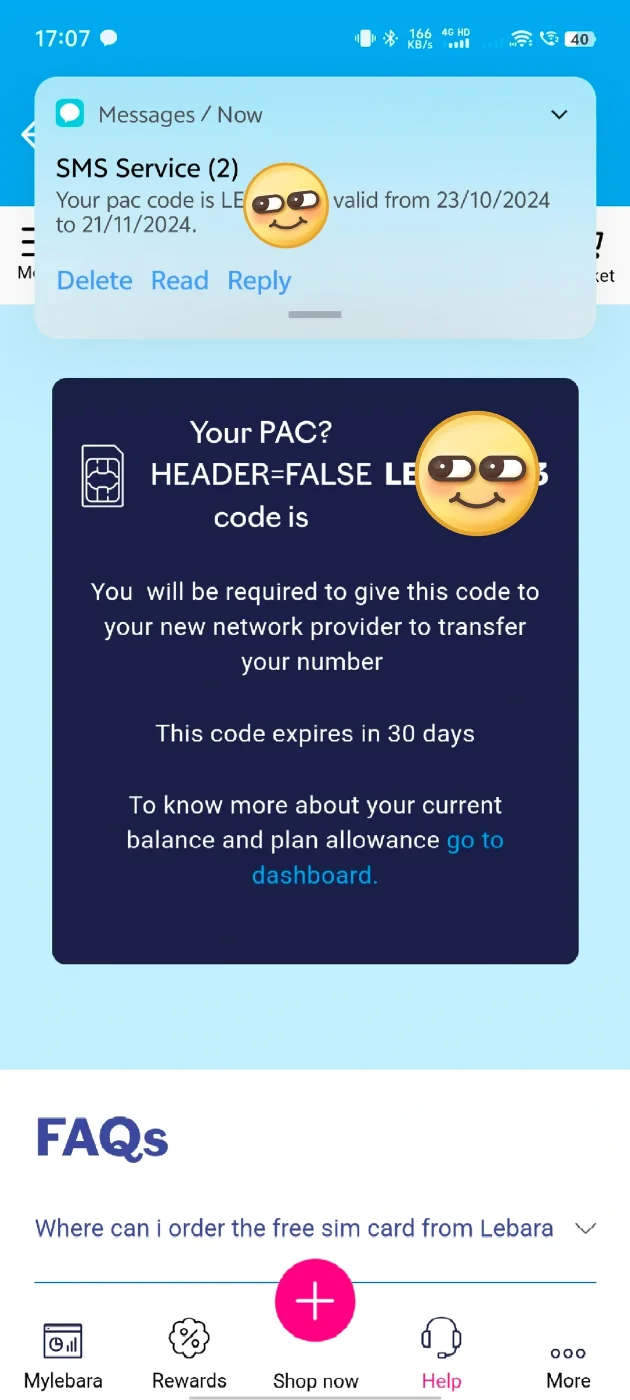
This guide explains an approach I have used: moving my existing number to another mobile provider temporarily, then transferring it to a new Lebara SIM. Three is the intermediate provider in this example.
An important distinction before you start: keeping your number does not automatically make you eligible for a new-customer offer. Check the specific promotion’s terms and ask Lebara if you are unsure. Buying a new SIM does not necessarily mean you qualify as a new customer.
1. Understand the three SIMs and three numbers
The easiest way to get confused is to treat a SIM card and a phone number as the same thing. Number porting allows you to move your phone number between providers while changing the SIM you use.
This process involves:
• S1: Your existing Lebara SIM.
• N1: The number on that SIM — the number you want to keep.
• S2: The Three SIM used as an intermediate step.
• N2: The temporary number originally supplied with the Three SIM.
• S3: Your new Lebara SIM.
• N3: The temporary number originally supplied with the new Lebara SIM.
The sequence is:
First, move N1 from your old Lebara SIM, S1, to the Three SIM, S2.
Once that transfer has completed, move N1 from the Three SIM, S2, to your new Lebara SIM, S3.
At the end, you are using the new Lebara SIM, S3, with your original number, N1. The temporary numbers N2 and N3 are replaced when the relevant transfers complete.
You are not moving your old allowance to a new SIM or adding a new promotional plan to your old SIM. You are transferring your existing number to a different SIM with its own service and plan.
2. Step one: buy and activate a suitable Three SIM in a shop
This step has changed since my original guide. At the time of my latest experience, Three’s online Pay As You Go purchase journey required choosing and paying for a plan. The old screenshots showing how to skip the Data Pack and order a SIM without a plan should therefore no longer be followed.
If you only need the SIM briefly for a number transfer, paying for an otherwise unnecessary package may reduce or cancel out the saving.
One option is to look in supermarkets such as Tesco or Lidl for a Three Pay As You Go SIM costing around £1. In my recent experience, some of these retail SIMs could be activated without buying an additional package, making them more suitable for this purpose.
However, availability, packaging and SIM batches vary. Not every shop will stock them, and not every £1 SIM has the same conditions.
Before buying, check:
• It is a Three Pay As You Go phone SIM, rather than a SIM from another provider, a data-only SIM or a Pay Monthly contract.
• Whether it can be activated without an additional Data Pack or top-up.
• Any activation deadline or other conditions printed on the packaging.
If the requirements are unclear, check with Three before buying the SIM or transferring your number. A low purchase price does not guarantee there will be no further costs.
Once you have a suitable SIM:
1. Insert the Three SIM, S2, into your phone and follow the activation instructions supplied with it.
2. Wait for activation confirmation and check that the phone has connected to Three.
3. Find and record its temporary number, N2, using the packaging, activation messages or account information.
4. Keep a separate record of your existing number, N1, and the new Lebara SIM’s temporary number, N3.
Use Wi-Fi where possible and switch off mobile data for S2 to avoid accidental out-of-bundle charges. If you have not bought a package, avoid ordinary calls, texts and mobile data unless you have checked the rates. Request your PAC using the provider’s free switching process.
Make sure S2 is activated and can receive texts before submitting your request to move your existing number to Three.
Three requires the receiving SIM to be activated by 5pm on the working day before the transfer date. For example, for a Monday transfer, activate it by 5pm on the preceding Friday, allowing for bank holidays.
The old online ordering, “skip Data Pack” and checkout screenshots are no longer used as instructions in this version.
3. Step two: move your existing number to Three
Request the first PAC from your old Lebara SIM
At this stage, N1 is still on your old Lebara SIM, S1. Use that SIM to send:
PAC
To:
65075
Requesting a PAC by text is free. You can also use Lebara’s available online process.
If you use a dual-SIM phone, check which SIM is sending the message. You need the PAC for N1, not for the other number in your phone.
Submit the transfer request to Three
Go to Three’s official website and look for its switching or keep-your-number service.
Follow the current form and provide the information requested, including:
• The existing number you want to keep, N1.
• The PAC issued by Lebara.
• The receiving Three SIM’s temporary number, N2.
• Any other required details and your preferred transfer date.
Check the numbers and PAC carefully before submitting. Keep the confirmation message or a screenshot of the completed request.
Wait for the first transfer to finish
Watch for updates on the scheduled date. Insert the Three SIM, S2, to check its status, then call N1 from another phone to see whether the phone containing S2 rings.
Also check that calls and texts are working. A successful application message confirms that your request was submitted; it does not, by itself, confirm that the number has transferred.
Once the first transfer has completed:
• Your original number, N1, is now on the Three SIM, S2.
• Three’s temporary number, N2, has been replaced.
• Your old Lebara SIM, S1, no longer carries N1.
For the next PAC request, use the Three SIM now carrying N1, not the old Lebara SIM.
4. Step three: request a new PAC from Three
The first PAC was for the move from Lebara to Three. To move from Three to your new Lebara SIM, you need a fresh PAC issued by Three.
According to Three’s current instructions, customers with a single number can request a PAC by sending the following from the number they want to keep:
PAC DDMMYY
To:
65075
DDMMYY means the date of birth registered on the account, written as day, month and a two-digit year.
For example, if the registered date of birth were 18 June 1986, the message would be:
PAC 180686
This is only an example. Use your own account’s registered details. If Three sends a further verification request, follow the official instructions. You can also request a PAC through My3 or customer support.
During one of my earlier transfers, requesting a PAC immediately after the number arrived at Three produced a technical error. It worked after allowing more time, so I built roughly a day’s waiting time into my own process.
That is my historical experience, not a universal requirement to wait exactly 24 hours. If you receive an error, first check that the incoming transfer has finished, the account has updated and the date-of-birth format is correct. Contact Three if the problem continues.
Do not begin the second transfer while the first is still pending, or submit repeated transfer requests while an existing request is unresolved.
5. Step four: move your number to the new Lebara SIM
Check that the new Lebara SIM is activated
Follow the instructions for your new Lebara SIM, S3, and check that it is working.
At this point, it still has its temporary number, N3. Keep that number handy and do not confuse it with N1, the number you want to retain.
Check the activation deadline on your order and promotion. Do not leave the new SIM unactivated indefinitely while arranging the intermediate transfer.
Open Lebara’s number-transfer service
On Lebara’s official website or app, look for “Keep your number” or its number-transfer page.
Follow the current form and supply the requested details, including:
• Your original number, N1.
• The new PAC issued by Three.
• The new Lebara SIM’s temporary number, N3.
• Any other required information and an available transfer date.
Keep the confirmation and wait for the transfer to be processed.
Check the final result
After the transfer completes, call N1 from another phone and check that the phone containing your new Lebara SIM, S3, rings.
Then check:
• Your original number is correctly associated with the new Lebara SIM.
• Incoming and outgoing calls work.
• Text messages can be sent and received.
• Mobile data works.
• The correct plan, price and promotional period appear in your account.
• The renewal settings match what you intend.
If everything has completed successfully, you are now using the new Lebara SIM, S3, with your original number, N1.
Keeping the number and receiving a promotional price are separate matters. Verify both rather than assuming one guarantees the other.
6. How long does the process take?
One of my relatively straightforward transfers followed this schedule:
• Day one: submit the request to move the old Lebara number to Three.
• Day two: the first transfer completes; allow time for the account to update.
• Day three: obtain the new PAC from Three and request the transfer to the new Lebara SIM.
• Day four: the second transfer completes; check the number and plan.
This is an example from my own experience, not a promise that the process will take four days.
Weekends, bank holidays, late SIM activation, account checks and technical problems can extend the timeline. SIM delivery time is not included in this example.
Use the dates confirmed by each provider and leave a buffer, especially if the number is needed for important calls or verification texts.
7. Frequently asked questions
Can I move my old Lebara number directly to another Lebara SIM with a promotional plan?
Do not confuse a replacement SIM, a plan change and a transfer between providers. A normal SIM replacement does not automatically make you eligible for a new-customer promotion.
Ask Lebara whether it can offer a suitable plan on your existing number before arranging an intermediate transfer. This article describes an approach I have used previously; it does not establish eligibility for every offer.
What is the difference between a PAC and a STAC?
This guide is about keeping your number, so you need a PAC. Do not select a switching process that gives up your existing number.
Do I need a different PAC for each transfer?
Yes. The two transfers have different outgoing providers.
For the first transfer, get the PAC from Lebara and give it to Three.
For the second, get a new PAC from Three and give it to Lebara.
Can I keep a PAC and use it whenever I like?
PACs normally remain valid for 30 days. Check the expiry information you receive. If it expires, request a new one from whichever provider currently holds your number.
Why is Three showing a technical error?
Possible causes include an incomplete incoming transfer, an account that has not yet updated, verification details that do not match or a system problem.
Check the transfer status and your details first, then contact Three if necessary. A technical error does not automatically mean your number has been lost.
Do I need to keep the temporary numbers N2 and N3?
Once each transfer completes, the receiving SIM’s temporary number is replaced by N1. If you have linked a temporary number to an account, update that account before the number is replaced.
Will my old credit or allowance transfer with my number?
Do not assume so. Number porting retains your phone number. Any remaining credit, allowances or refund entitlement are handled under the outgoing provider’s rules.
Is this also a guide to keeping a UK number active while living abroad?
No. This guide covers retaining a number while changing providers. Long-term use outside the UK involves separate roaming, activity, top-up and disconnection rules, which need to be checked independently.
8. Final checklist
Before starting, check that:
• You have confirmed eligibility for the new Lebara offer, rather than simply confirmed that you can buy the SIM.
• You understand the intermediate SIM’s costs, activation requirements and any renewal settings.
• You have recorded all three SIMs and their numbers separately.
• The first transfer has completed before starting the second.
• The second PAC is a fresh code issued by Three.
• You will check the number, calls, texts, mobile data and actual plan price after the final transfer.
The aim is not to rush through the process. Confirm each stage has completed before moving to the next.
This guide combines the author’s historical experience with providers’ publicly available instructions. Website layouts, prices and promotion conditions can change. Follow the relevant provider’s current requirements and the terms of the specific offer you are considering.
For more UK SIM deals, grocery cashback and practical savings information, visit:
http://ukluyangmao.com/
You can leave a question below, or contact the creator on RedNote (小红书) under the name 爱丁堡的小鼠国.
Do not post your full phone number, PAC, date of birth, verification codes or payment details in public comments.
Reader discussion
Comments are reviewed before publication. Names and emails are not identity-verified. Never post passwords, payment details or identity documents. No email notifications are sent; revisit this page for replies.